Today I’m working on organizing my recipes. I’ve been going over my system to decide if changes are needed or not. I’m paying attention to the following:
a) can I find the recipes I need and b) can I find them in less than 2 minutes
And the answer to that, despite my lack of filing, is yes. So I’m feeling pretty confident in my system, I just need to commit to filing the printed recipes on a more regular basis.
It actually wasn’t as bad as I thought. I counted 129 pages that needed to be filed into my binders.
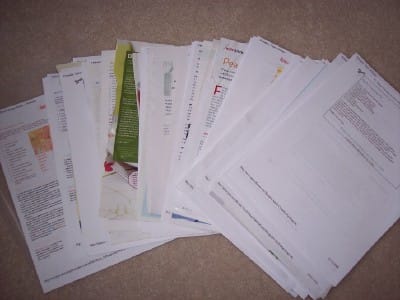
I need to weed through these though and really narrow it down to the ones I think I will honestly make again because only the favorites get put into my binders. Once I’ve done that I can three hole punch them and file them in.
I currently have three binders:
1) Gluten/Dairy/Egg Free Recipes
2) Main Dishes (beef/chicken/pork/etc)/Salads/Dips/Soups/Appetizers/Drinks
3) Pies/Cakes/Muffins/Cookies
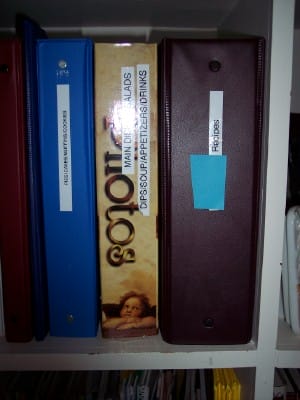
In an effort to pretty up my binders and inspire my filing efforts I have purchased two new 2″ white binders and will consolidate three binders into two. Most of the allergy friendly recipes in the big brown binder I no longer refer to. As I’ve gotten more experienced with dealing with food allergies I am now, in most cases, able to just adjust whatever recipe I am using for the rest of the family. Many of these recipes were printed at the start of my food allergy journey but require too many strange ingredients that I can’t even get in my small town.
I have a cookbook shelf in my office. It’s the middle one.
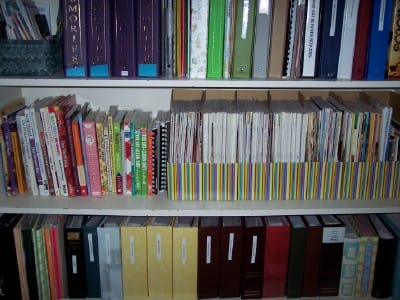
(the blue blobs are just me covering up my kid’s names)
My cookbooks are on the left and my beloved cookbook magazines are divided in the seven magazine holders. They are organized by type (Light & Tasty, Taste of Home and Healthy Cooking) and then in chronological order by year and month. As you can see my shelf is full so I’ve actually been exhibiting great restraint in not purchasing anymore. Not an easy feat though let me tell you. Believe me I totally get the cookbook obsession so many of you talked about, only my addiction is with the magazines 🙂
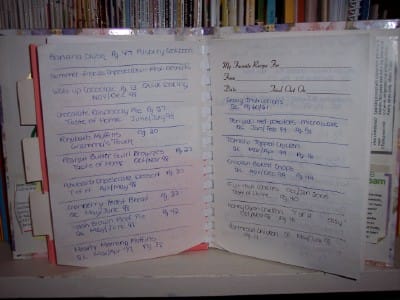
I use a recipe journal as my index to keep track off all my favorite recipes that come from these magazines. Nothing fancy, I simply write into it the recipe name, the magazine it came from along with the month and year. This works amazingly well for me.
Finally since I’m talking about my recipe systems, I can’t forget to mention that I also have a system for categorizing the recipes that I find on the internet. I created a recipes folder in my favorites and then created sub directories using similar categories as I use in my binders. They are:
Allergy Friendly
Appetizers
Beef
Breads/Muffins
Breakfast
Chicken
Desserts (sub: Cookies)
Drinks
Meatless
Pizza
Pork
Potatoes
Salads
Soup
Vegetables
Using these categories makes menu planning very easy for me as recipes are filed the way I menu plan. When I menu plan I first designate a type of meat to a certain day and then choose my recipes based on that. So if I know I’m having pork on Wednesday I can quickly go to the pork sections in either my binder, my favorites or my online index in order to select a recipe to try.
Here are the links to my previous recipe posts for further ideas.
A different take on a recipe binder
And remember there are many ways to organize and categorize recipes and no one method is right or wrong as long as it works for you. Also I highly recommend keeping your eye on the comments of the various recipe posts I’ve done as many ladies are sharing the methods that work for them. Please feel free to share here as well.
I’m off to do some hole punching now 🙂
I desperately need to organize my recipes. I finally threw away my printed ones a while ago, I’ll start over with those. My magazines will take forever to go through. I have boxes still packed away from our move 2 years ago.
Ah, recipe books. We moved in 2007 and I got rid of many at that time, haven’t re-accumulated due to small space to store ’em. Plus I print out 4×6 sized cards and put them in a file box. That has worked better for me. When I started trying to “meal plan” last year I started looking thru the loose recipes (not in books) and here I still am trying to get them into the box. That system works, but I need to follow thru better! And pitch the ones we’re not going to use.
I totally love your recipe journal, this is definitely going on my project to do list – brilliant idea. I inevitably get distracted and wander around our recipes when I am looking through books and this would so keep me focused!
We have limited our cookbooks to one shelf. I honestly only use about five of them regularly but my husband cant stand to part with them… so what I do is one in, one out… I would love a shelf with just the ones I use and love and are worn – but my compromise is a shelf that doesn’t expand!
I have a box of recipes that I have snipped from magazines but never use because it is just too overwhelming to open! I really should ditch it without lifting the lid!
I wish I could keep paper so neat. It’s my bane. I’ve opted over the last few years to start converting my recipes to digital in OneNote (since I had it). It’s helped me so much. There’s a few regular recipes I keep out and printed (with a magnet to the fridge), but anything else I print as I need it.
I agree with Avlor about OneNote. It really helps me reduce the paper clutter. I can go to a magazine’s website and put a recipe right into my OneNote “recipe box”. I got rid of all my internet bookmarks and paper tearouts and put them in as well. Love it!
OK I have got to do this! You have inspired me to get with it once again!
For online recipes, I set up a gmail email account. I then email the recipe to that account, and tag it with the appropriate tags (vegetable, side dish, etc).
I can then do a search on those tags to find recipes that I like. Works well, when I keep up with it!
Any suggestions for all of those recipes on recipe cards? I have 3 ring binder book stuffed with those (they are really stuffed!) What would be the most efficient way to organize those? Should I type them, print them out and add them to the binder? I plan to take all of my loose recipes out of various file folders and punch them and then organize them into binders. I’ll post before and after pics at the end of the month.
I keep all of my printed recipes organized in a binder, too. I use dividers to separate them by type (appetizer, beef, pasta, veggie, etc.) and then they’re all alphabetized within each section. My problem is recipes like “best ever braised cabbage” Do I file it under “C” for cabbage or “B” for best? If I can’t find my cabbage recipe with the “c’s”, I have to flip through all my veggie recipes to find it. But then it’ll drive me crazy to hae it not completely alphabetized. I think I’m a bit too anal about these things sometimes! lol
I put all my recipes on my Myfamily.com website. Other family members can add to it as well. You can also attach categories to them like the ones that you listed. You can search by category or key word to find the recipe that you want. You can add notes and comments to the recipe. When I want to cook it, I either have my laptop handy or just print out the recipe I want to use. You can access the recipes from any computer. If you find a recipe online that you want to try, you can cut and paste it to your site to try later. Many of the magazines I get also have the recipes online so I just find them, cut and paste, and I no longer have to keep the magazine for those one or two interesting recipes.
I started the site six years ago to share baby pictures with distant relatives, but it has turned out to be an even better storage for all my family’s recipes (now up to 480).
I will eventually take my favorites (cut and paste) and create a book with them. Maybe using Kodak gallery or another software online that may specialize in cookbooks.
I still have a shelf full of cookbooks, but I use my online version most of the time.
At first I thought… YAY I am exempt from this one. Then I saw your picture of printed recipes… and thought, “I forgot about those”.
Right now I use the big colored index cards for meal planning. They come in four different colors so, what I do is assign a different meat to the cards. For example all beef recipes go on blue cards, all the chicken recipes go on the yellow cards, etc. But, that’s not all, on the front of the card I write the recipe and on the right hand side what sides to make and on the back I write the shopping list for that recipe. So this way when I plan out my meals I can pull out the cards I want, see what I have on hand and what I need to buy. I put the all in a clear plastic mail sorter that has a big magnet on the back so I can stick it to the fridge.
I really like the idea of a recipe journal so that you can find what book a certain recipe is in. I’m adopting that one!
Roan, do you have your recipe cards in a recipe box? You could use tab dividers to divide them into categories. Or do you want to get away from recipe cards altogether?
Kristen, I would add cabbage to vegetables if it were me.
Trina, I’ve never heard of that site, please tell me more!
Susan, that is a terrific idea!
Recipe organization is something I need to do, both online and off. I have recipes in the kitchen, on the desk, on my dresser, very unorganized. Thanks for the inspiration!
I really want to get away from recipe cards altogether. They are in a recipe card binder…..very messy. It was as wedding gift 17 years ago. I want to put all of my recipes in a 3 ring (or more than one) binder. I like the idea of dividing the recipes into categories and then alphabetizing them by name. I am excited to get started. Should I just type up all of the recipe cards onto paper?
I couldn’t cook without my recipe index! Glad someone else uses one!
Roan something else I might suggest to keep you from having to type them all up (unless of course you want to) is to insert them into a photo album of some kind. Most photo albums are three ringed so you could add some dividers to it. You could also use the ones with the plastic cover that peals across but those often turn yellow and don’t last as long. Something to think about anyway.
I have been working on my recipes today, and I have found a system that will work. I plan to blog about it tonight (hopefully). Thanks so much for all of your suggestions. I have needed to tackle this for so long!
Awesome ideas…I am going to start organizing mine this week. I have a binder started, but need to revamp it! Thanks for the ideas…
That is incredibly impressive. Why am I such a free spirit in the cooking department anyway? I think I’m too much of a free spirit in general. Oh well. This is inspirational.
I am impressed yet exhausted reading your post. I am also thankful I don’t have even half as many recipes as you do! With Allrecipes.com most of my favorite recipes are now stored on my computer.
Toni
That looks like a full day’s work. Which I wish I had to dedicate that this project.
I’m going to go through my cookbooks and see which ones we’re no longer using and donate them.
Great idea. I love your system!
Hi!
I started scanning mine into my computer, this way I can keep my mothers hand written notes and find them in files (folders) and not drive my paperless husband crazy.
I have all my printed recipes in 3-ring binders and the pages all in plastic sheet protectors. To solve the problem with recipe cards, I took all my recipe cards and stuck them onto sheets of paper (as long as they are only written on one side of the card). I can fit a few cards per page, I then slip it into a sheet protector in my binder. I like the sheet protectors because I can then wipe them off when I spill something on them while cooking (which usually happens to me!).
Oh, I knew I shouldn’t have been reading blogs today 🙂 Now, I have a project to do that I have been putting off. I have been adding in new recipes to our meal planning but all the printed sheets are folded into my recipe box… not filed. I need to get them transferred to index cards and filed in the correct spots.
I also want to laminate all of my cards, so I guess I will be getting to that. 🙂
Plus, my sister-in-law is getting a new house (moving out of mom’s) and I want to make her a recipe scrapbook of my recipes that she loves. So, I guess as I am organizing, I need to type up others to get busy on her scrapbook. We are headed to Orlando next week and that would be a great project for me to work on if I have all my recipes printed.
Great ideas! I like having the recipes I know I’ll use in an actual recipe box – guess I’m old school that way! I use Google Notebook to keep track of any recipes I find online that I think I might like. Then, once I try one of those, if I know I’ll make it again, it goes in the recipe box.
Don’t punch holes in your recipes! Buy a set of sheet protectors…put all 100 in your binder…and just slide the recipe in each one…this way you can see them and not have them stained by food spills since the sheet protectors keep them nice…and you can easily remove to copy if you ever need to share with others. 🙂
Heather I like that idea but was always so worried about the cost involved in buying that many sheet protectors. However I believe I saw them for sale at the dollar store so I’m going to check that out today when I go downtown. Thanks!
I love that even your handwriting is neat!
This is wonderful. I really need to tackle my recipes. Thanks so much!
Holy SMokes that is alote of books. I don’t have space to store binders like that so I really have to whittle it down. I keep one binder and print off my recipes and place in sheet protectors. The files are kept on my computer in case they need editing. When I find one I would like to try I file it on the computer and if I try it and like it I then print it off. The ones in my binder are tried and true ones. At least twice a year I go through the binder (similar to my closet) and purge the recipes that I have not made. Chances are I never will. As our family expands, easy and frugal are the ones I reach for.
I did a post on this very subject last fall; it’s my saving grace and impresses my husband when I can put my hands on a second’s notice!
Oops… Here’s the link. I use pocketed divider pages and sheet protectors as well as 4×6 photo sleeves and it all works great!
Okay, I AM an IDIOT! LOL!!!
http://easyathome.blogspot.com/2008/11/recipe-binders.html
Balancing a 2 year old on your lap while typing doesn’t always work so well! LOL!
I use a binder for my printed recipes and put them into sheet protectors. Buying the lighter weight ones isn’t that expensive. The binder is divided into sections. One page recipes get put in back to back to save space. The only recipes that make it into the protectors are tried and true.
The things I print “to try” are put in a file pocket in the appropriate section of the binder. That way, if we try something and don’t like it, just toss the recipe. If we like it, it gets a page protector of it’s own.
I like the journal idea. I think I will add a page to each section of the recipe binder to reference the collection of Taste of Home and Quick Cooking.
I have a ton of recipes that I’ve torn from magazines waiting to be scanned or retyped. I’ve started trying to get all of my recipes into text files instead of Word to save space. I have a recipes folder on my computer and then folders for the different categories in each one. It makes it easy to search for them.
One day I’ll get to that stack of recipes…
With your collection of recipes, you would need a sturdy shelf to hold that. Just wondering what material your bookshelf in the photo is made of?
Hi Laura,
Gee you’ve worked so hard! You should just SCAN each of your pages and then FILE them using a database program or even save them as Picture Files.
You would categorize them the same way you have them manually .. but, it will be a whole lot easier to FIND the one you want IN A HURRY when you need it!
AND TAKE UP NO SPACE AT ALL!!!
Laura, I use MasterCook software on my computer http://www.valusoft.com
Not only does it come with cookbooks & recipes already on it, but you can add or import your own recipes & make your own cookbooks.
I’m not gonna say that I don’t have a ton of cookbooks (I collect gooseberry patch, paula deen & brand name cookbooks)
I too had alot of cookbooks and cooking magazines (some of the same you have) I would love a recipe and then when I went to make it again–I had to “find” it among pages of a magazine I`ll never go through again–so I went through and cut up my magazines and cookbooks taking only the recipes I really love (they add up fast enough without keeping the hundreds I don`t use) and put then in a large 3-ring Photo book–my recipe`s slide nicely in the photo slots and I can find them in seconds–no more searching through magazines. And–it cut down on the room I needed to store them. I realized I`m never going to really make all those recipes-especially with new magazine coming in each month with even more recipes to try!!
Oh how I love recipes…I have several different systems. The first is family recipes. I have a recipe card book for my family and my husband’s side. So if it is a recipe from my family I jot it on the card and put it in the appropriate category and likewise for my mother-in-law’s recipes (she is a great cook so I have a lot). The idea is that one day when I am no longer cooking for my children they will already have the family recipes together in one spot and know who it was from. Then I have a recipe box…not my favorite method of organizing, however, I was given the recipe box from a special friend and can’t really part with it…thus if it is a recipe from a friend it goes on an index card in the approrprate category in the box. Then the famous magazine/internet recipes…evnetually make it into a 3 ring binder under the approprpiete category as well….but it seems to take a long time to get to the binder. Until it makes it to the binder I keep it in a folder….that way they are all in one place. One side of the folder says “Recipes to try” and the other side says “Recipes Tried and to be Filed”. In my perfect recipe world all the loose ones are together in one folder waiting to be filed or tried. Oh an and my cookbooks…if I make it, I highlight and and write notes…easy, good, loved it, hated it etc. This is a 2 fold reason….again one day I think my children may read my cookbooks and learn a little about me…(“wow Mom made this for the first time before we were born?”) and the 2nd reason is I am a very visual person and this helps me to remember the meal/recipe. I also try to highlight it in the index for a quick reference too. Hope this helps someone! Happy oraganizing!
I have many binders for recipes. I bought lime green card stock to slip into page protectors. I then trim and tape my recipe to a page and leave space for notes and changes. These are my binders: baking with tabs for quick breads, cupcakes, cookies, frostings etc.
entrees’- chicken, beef, soups/stews, seafood etc
drinks/ frozen
snacks/ appetizers
breakfast
and others that I can’t think of. So versatile, protected from splashes too. I am given magazines often, and I clip out recipes for my binders then offer the magazine to someone else or recycle to keep my clutter down to a minimum. They are on a shelf in my living room where I can snuggle in with hot tea and create my menu and store list for the 2 weeks.